Layered Cobra Snake SVG File – A Bold Design for Laser Cutting Enthusiasts
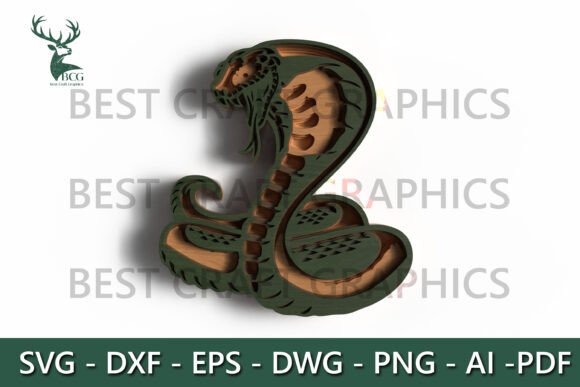
For those who appreciate the fusion of art and precision, the Layered Cobra Snake SVG File offers a compelling way to bring bold, dimensional designs into laser cutting projects. This intricately crafted SVG file features a coiled cobra with a layered 3D effect, making it ideal for wildlife lovers, home decor creators, and makers who want to elevate their output. Whether you're crafting a statement wall piece or designing a unique gift, this SVG provides a visually rich and technically adaptable option for laser machines like Glowforge, Cricut, and xTool.
Understanding the Appeal of the Layered Cobra SVG
The Layered Cobra Snake SVG File stands out due to its detailed layering, which mimics depth and movement when cut and assembled. Unlike flat vector images, this design uses multiple layers to create a lifelike, dimensional effect that adds visual interest and craftsmanship to any project. It's particularly popular among makers who want to explore intermediate-level laser cutting while producing a polished, professional result.
Its compatibility with various file formats—SVG, DXF, EPS, PDF, PNG, AI, and DWG—ensures broad usability across different design and cutting software. The file is clean and watermark-free, allowing for immediate use in personal or commercial projects without additional cleanup or licensing concerns.
Common Mistakes When Using the Layered Cobra SVG File
While the Layered Cobra Snake SVG File is a powerful design asset, users—especially beginners—often encounter pitfalls that can affect their results. Being aware of these common issues can help you avoid frustration and wasted materials.
1. Misjudging Material Thickness
One of the most frequent errors involves not matching the SVG’s layer design with the material thickness. Since the file is optimized for 3mm plywood, MDF, acrylic, or similar materials, using thinner or thicker stock without adjusting the design can lead to misalignment or an unstable final build.
Better approach: Always verify your material thickness before cutting. If using a different thickness, scale the layers proportionally in your design software to maintain proper fit and structure.
2. Ignoring Layer Order and Assembly Logic
The 3D effect of the cobra depends on precise layer stacking. Skipping or misordering layers can result in a distorted or unrecognizable image. Some users mistakenly treat the file like a standard flat SVG and attempt to cut it without separating and organizing the layers properly.
Better approach: Take time to study the layer sequence included in the file. Most SVG editors allow you to isolate and color-code layers for easier assembly. Print a paper mockup first to test the layout before cutting your final material.
3. Overlooking File Compatibility
While the file supports multiple formats, not all software handles layers and vector paths the same way. Users sometimes download the file in a format incompatible with their machine or design program, leading to missing layers or distorted outlines.
Better approach: Confirm which file format your laser machine or software supports best. SVG is generally versatile, but DXF or PDF may be more reliable for certain CNC or laser platforms. Always open the file in your software before starting your project to ensure everything imports correctly.
4. Rushing the Cutting Process
Impatient users may skip the test cut phase, assuming the design will work perfectly on the first try. This can lead to costly errors, especially when working with expensive materials like acrylic or hardwood.
Better approach: Always perform a test cut on scrap material. Adjust your machine settings—especially power and speed—for optimal cut quality. This helps avoid burning, incomplete cuts, or chipping, especially in materials like MDF or acrylic.
What to Check Before Downloading or Using the File
To ensure the Layered Cobra Snake SVG File meets your expectations and project needs, consider the following points before downloading or using it:
- Material suitability: Does the file work best with 3mm materials? Can it be adjusted for other thicknesses?
- File format options: Are the included formats compatible with your laser cutter or design software?
- Layer organization: Is the file well-structured with clearly labeled layers for easy assembly?
- Commercial use rights: Is the file licensed for resale or commercial production if that’s your goal?
- User support: Is there access to documentation or guidance from the file provider if you run into issues?
Real-World Applications and Creative Ideas
This Layered Cobra Snake SVG File isn't just for wall decor. With a bit of creativity, you can repurpose it into various projects:
- Custom gifts: Personalize the design with names or dates for a unique gift for reptile lovers or collectors.
- Themed room decor: Combine with other wildlife SVGs to create a jungle or exotic animal theme in a bedroom or office.
- Art installations: Use acrylic or colored MDF to create a vibrant, eye-catching centerpiece for galleries or events.
- Educational tools: Teachers or educators can use the design to create tactile learning aids for biology or art classes.
Final Thoughts
The Layered Cobra Snake SVG File is more than just a design—it's a versatile tool for laser cutting enthusiasts who want to add depth, detail, and drama to their work. By understanding its capabilities and avoiding common mistakes, you can maximize its potential and create stunning, professional-grade results. Whether you're a hobbyist, small business owner, or creative professional, this SVG file offers a unique opportunity to blend craftsmanship with modern technology.
Before you begin your next project, take a moment to review your materials, settings, and assembly plan. With thoughtful preparation and a clear understanding of the file’s features, your layered cobra design can become a standout piece in any collection.