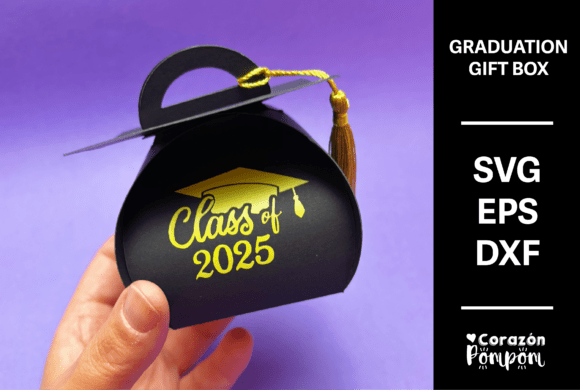
Graduation Gift Box Digital Cutting File
Designing a meaningful, customised gift for a graduate doesn’t have to be complicated. The Graduation Gift Box digital cutting file offers a practical, creative solution for anyone looking to craft a unique presentation using a cutting machine. Whether you're a hobbyist, small business owner, or educator, this versatile file empowers you to personalise and elevate your gift-giving experience with minimal effort and maximum impact.
What Is the Graduation Gift Box?
The Graduation Gift Box is a digital design file created specifically for use with craft-cutting machines like Cricut and Silhouette. It includes multiple file formats—SVG, EPS, and DXF—to accommodate various machine types. The design features score lines for easy assembly and is layered, requiring a simple setting adjustment to ensure proper scoring and cutting. This file allows users to resize and recolour the design to suit their preferences and printing capabilities.
Key Features and Benefits
- Multiformat Compatibility: With SVG, EPS, and DXF versions included, the file supports a wide range of cutting machines, giving you flexibility in how you create.
- Layered Design: The dual-layer setup allows for clean scoring and cutting when adjusted properly, ensuring a polished final product.
- Customisable: Easily resize and recolour the design using your preferred design software to match your theme or recipient’s preferences.
- Print-and-Cut Ready: Ideal for use with transfer paper or directly on cardstock, this file supports both digital and physical crafting workflows.
Real-World Applications
The Graduation Gift Box is more than just a digital file—it’s a tool for creative expression across multiple environments:
Personal Use
For friends and family, this file allows you to create a thoughtful, handmade gift box that holds a diploma, gift card, or keepsake. You can personalise the box with the graduate’s name, graduation year, and favourite colours, making it a memorable keepsake.
Small Business and Entrepreneurial Use
Craft businesses, Etsy sellers, and boutique gift shops can use the Graduation Gift Box to offer custom graduation packages. By bundling the box with small gifts, candles, or stationery, you can create premium, ready-to-sell gift sets that appeal to a wide audience.
Educational and Institutional Use
Schools, clubs, and youth organisations can use this design to create uniform gift boxes for award ceremonies or student recognitions. It’s an elegant way to present certificates, medals, or class mementos while reinforcing school spirit.
Creative and Digital Workflows
Graphic designers, paper crafters, and digital artists can integrate this file into larger design projects. Whether you're designing a graduation-themed scrapbook, invitation suite, or social media graphic, the Graduation Gift Box file adds a tactile element that enhances your digital content.
How to Use the Graduation Gift Box File
Using the file is straightforward, but attention to detail ensures the best results:
- Download and Extract: Once downloaded, unzip the file and save the format compatible with your cutting machine.
- Adjust Layers: Make sure to switch the top layer from “cut” to “score” in your design software to avoid unnecessary cuts.
- Resize and Recolour: Tailor the box to your needs by adjusting the dimensions and colours. This is especially helpful if you're matching a theme or brand palette.
- Test Cut: Always perform a test cut on scrap material before finalising your project to confirm settings and alignment.
Design Tips for Best Results
To get the most out of your Graduation Gift Box file, consider the following tips:
- Use High-Quality Cardstock: Thicker paper ensures structural integrity and a professional finish.
- Pair with Complementary Elements: Add tissue paper, ribbon, or a handwritten note inside the box to enhance presentation.
- Label or Tag Add-Ons: If you’re not including a tassel (which is not part of the file), consider adding a tag or label to personalise the box further.
- Batch Production: If you're making multiple boxes, use your machine’s duplicate and arrange functions to optimise cutting space and time.
Considerations for Implementation
Before diving into your project, take time to evaluate your tools and workflow:
- Machine Compatibility: Confirm that your cutting machine supports the file type you intend to use—SVG, EPS, or DXF.
- Software Requirements: Ensure your design software (like Cricut Design Space, Silhouette Studio, or Inkscape) can open and manipulate the file effectively.
- Time and Skill Level: While the file is user-friendly, beginners may want to watch a quick tutorial on layer settings and scoring techniques to avoid common pitfalls.
- Printing vs. Cutting: If you’re printing the design onto transfer paper, adjust your printer settings to match the file size and orientation for accurate results.
Why Choose the Graduation Gift Box?
The Graduation Gift Box stands out for its versatility, ease of use, and adaptability across different creative and commercial applications. It bridges the gap between digital design and physical crafting, giving you full control over the final look and feel of your project. Whether you're making one box for a loved one or dozens for a business offering, this file delivers consistent, professional results with minimal effort.
By investing in a well-structured digital cutting file like the Graduation Gift Box, you’re not just buying a template—you’re gaining a reusable asset that enhances your creative output and customer satisfaction. It’s a smart addition to any digital crafting toolkit, especially for those who value quality, efficiency, and personalisation in their work.