Deck Out Your Space with a Spooktacular Halloween Banner SVG
Introduction to Halloween Banner SVGs
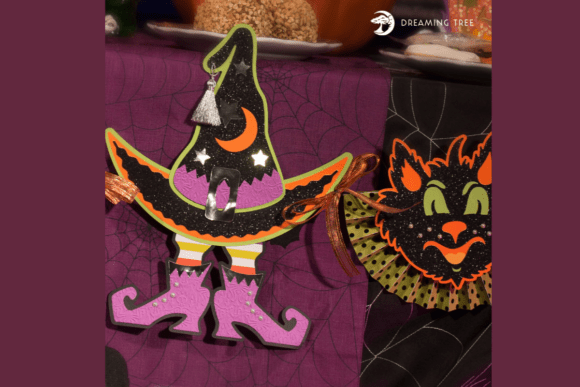
As the crisp autumn air rolls in and the leaves begin to change, many people start thinking about how to decorate their homes, classrooms, or party spaces for Halloween. One of the most versatile and eye-catching ways to celebrate the season is by using a Halloween Banner SVG. These Scalable Vector Graphics files offer a convenient and customizable way to create stunning decorations that capture the spirit of Halloween. Featuring classic spooky icons like witches, black cats, pumpkins, skulls, and webs, these banners are designed to bring charm and flair to any space.
What Makes a Halloween Banner SVG Special?
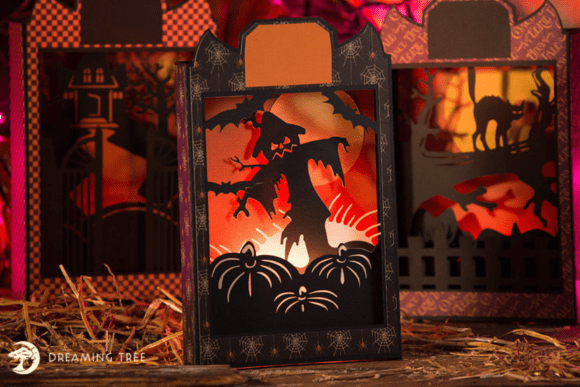
The Halloween Banner SVG described here is a perfect example of how digital design meets hands-on creativity. It includes layered silhouettes that create a rich, dimensional effect when cut and assembled. This design is not only visually bold but also easy to put together, making it ideal for both beginners and experienced crafters.
One of the standout features of this banner is its SVG format, which allows for seamless compatibility with most digital cutting machines and software. Whether you use a Cricut, Silhouette, or another SVG-ready tool, you’ll be able to bring this design to life with ease. The included PRINTABLE PDF legend helps you identify each piece and choose the best colors for your project, ensuring a smooth crafting experience from start to finish.
Why Choose SVG for Halloween Decor?
SVG files have become increasingly popular in the crafting world due to their flexibility and precision. Here are a few reasons why SVG is a great choice for Halloween décor:
- Scalable Without Losing Quality – You can resize the design to fit any space without worrying about pixelation or distortion.
- Compatible with Cutting Machines – Most modern electronic cutting machines support SVG files, making them easy to work with.
- Customizable – You can modify colors, layers, and elements to suit your personal style or event theme.
Understanding the Design and Dimensions
This Halloween Banner SVG has a finished size of 13.5 inches in height and 48 inches in width, making it an excellent statement piece for mantels, walls, or party backdrops. While it’s designed for a 12×12 inch cutting mat, you can easily adjust the dimensions to fit your specific layout or space.
Keep in mind that resizing may slightly alter the original proportions, so it’s a good idea to test the layout before cutting your final pieces. The included step-by-step video tutorial ensures that even first-time crafters can assemble the banner with confidence and precision.
Materials Needed for Assembly
To complete this Halloween banner project, you’ll need a variety of cardstock, pattern paper, and embellishments. Here's a breakdown of the supply list:
- 3 Sheets of 12×12 Black Cardstock
- 1 Sheet of 12×12 Cricket Cardstock
- 2 Sheets of 12×12 Carrot Cardstock
- 2 Sheets of 8.5×11 Dandelion Cardstock
- 1 Sheet of 8.5×11 Grape Cardstock
- 3 Sheets of 12×12 Green Pattern Paper
- 3 Sheets of 12×12 Purple Pattern Paper
- 1 Sheet of 8.5×11 Silver Foil Paper
- 3 Sheets of 12×12 Black Glitter Paper
- 1 Silver Tassel
- Embossing Folder: Cricut Haunted Damask
- Faux Pearl Stickers
- Ribbon and Black Copper Wire
These materials are chosen to complement the spooky yet charming aesthetic of the banner. From glitter accents to patterned papers, each element contributes to the overall visual appeal of the final product.
Step-by-Step Crafting Guide
Creating your Halloween Banner SVG is a fun and rewarding process. Here’s a general overview of how to proceed:
- Download and Prepare the Files – After purchasing the SVG and PDF files, download them to your computer and load the SVG into your cutting machine software.
- Review the PDF Legend – Use the provided PDF to identify each piece and plan your color scheme.
- Cut the Pieces – Using your cutting machine, cut out all the pieces from the appropriate cardstock and pattern paper.
- Assemble the Banner – Follow the video tutorial to layer and attach the pieces, creating a dimensional effect.
- Add Embellishments – Enhance your banner with faux pearls, tassels, and other decorative elements.
- Mount and Display – Once assembled, hang your banner in your chosen space and enjoy the festive atmosphere.
Where to Use Your Halloween Banner
Whether you're decorating your home, classroom, or hosting a Halloween party, this banner adds a festive touch that’s sure to impress. Here are a few ideas for where to display it:
- Haunted Mantel – Place the banner above your fireplace for a dramatic focal point.
- Party Backdrop – Use it as a backdrop for a Halloween photo booth or snack table.
- Classroom Decoration – Teachers can hang the banner in the classroom to get students excited about the season.
- Window Display – Attach the banner to a window for a spooky silhouette effect that’s visible from outside.
Customization Ideas
While the original design is already charming, you can personalize your banner to match your specific style or event. Here are a few customization ideas:
- Color Variations – Swap out traditional black and orange for purple and silver or green and gold.
- Theme Additions – Add themed elements like ghosts, bats, or tombstones to create a unique twist.
- Interactive Elements – Make parts of the banner moveable or interactive, like a spinning witch or a swinging cat.
Benefits of Using Digital Cutting Files
SVG files like this Halloween Banner SVG are part of a growing trend in digital crafting. Here are some benefits they offer:
- Instant Access – No waiting for shipping—download and start crafting right away.
- Eco-Friendly – Reduce paper waste by printing only what you need.
- Cost-Effective – Often cheaper than physical kits, especially when you can reuse the file.
- Reusable – Save the file and use it year after year for Halloween celebrations.
Common Misconceptions About SVG Files
Despite their popularity, there are still some misunderstandings about SVG files. Here are a few common myths and the truth behind them:
- “SVG files are only for professionals.” – Not true! With a video tutorial and a clear PDF guide, even beginners can successfully complete SVG projects.
- “You need expensive software to use SVGs.” – Many free and affordable programs support SVG files, including Cricut Design Space and Silhouette Studio.
- “SVGs can’t be resized.” – On the contrary, SVGs are vector-based, meaning they can scale infinitely without losing quality.
Conclusion: A Hauntingly Beautiful Addition to Your Halloween Décor
The Halloween Banner SVG is more than just a decoration—it’s a creative project that brings joy, festivity, and a personal touch to your Halloween celebrations. With its charming design, easy assembly, and compatibility with modern cutting tools, it’s a must-have for anyone looking to elevate their seasonal décor. Whether you're a parent, teacher, party planner, or just a Halloween enthusiast, this banner is sure to make your space stand out.
So, grab your cutting machine, gather your supplies, and get ready to deck out your space with this spooktacular Halloween Banner SVG. It’s time to bring your Halloween vision to life!